← WorkCommercial Loan Closing
Sr. Service Designer · Regional bank · Salesforce + nCino

Redesigning Commercial Loan ClosingA Dependency-Led Service Redesign

The closing workflow ran on 60–80 tangled Flow elements, and nobody on the team could say what depended on what. I mapped every dependency first, then redesigned only what the map showed was safe to change. Closing time came down by 76%, with zero downstream breakage.

76%Closing time reduced
17 → 4 days max
2,940Hours saved
annually
99%First-time accuracy
up from 88%
0Compliance findings
post-change
Loan Officer Console · LN-204981
Loan Officer Console screen
Validation Dashboard screen
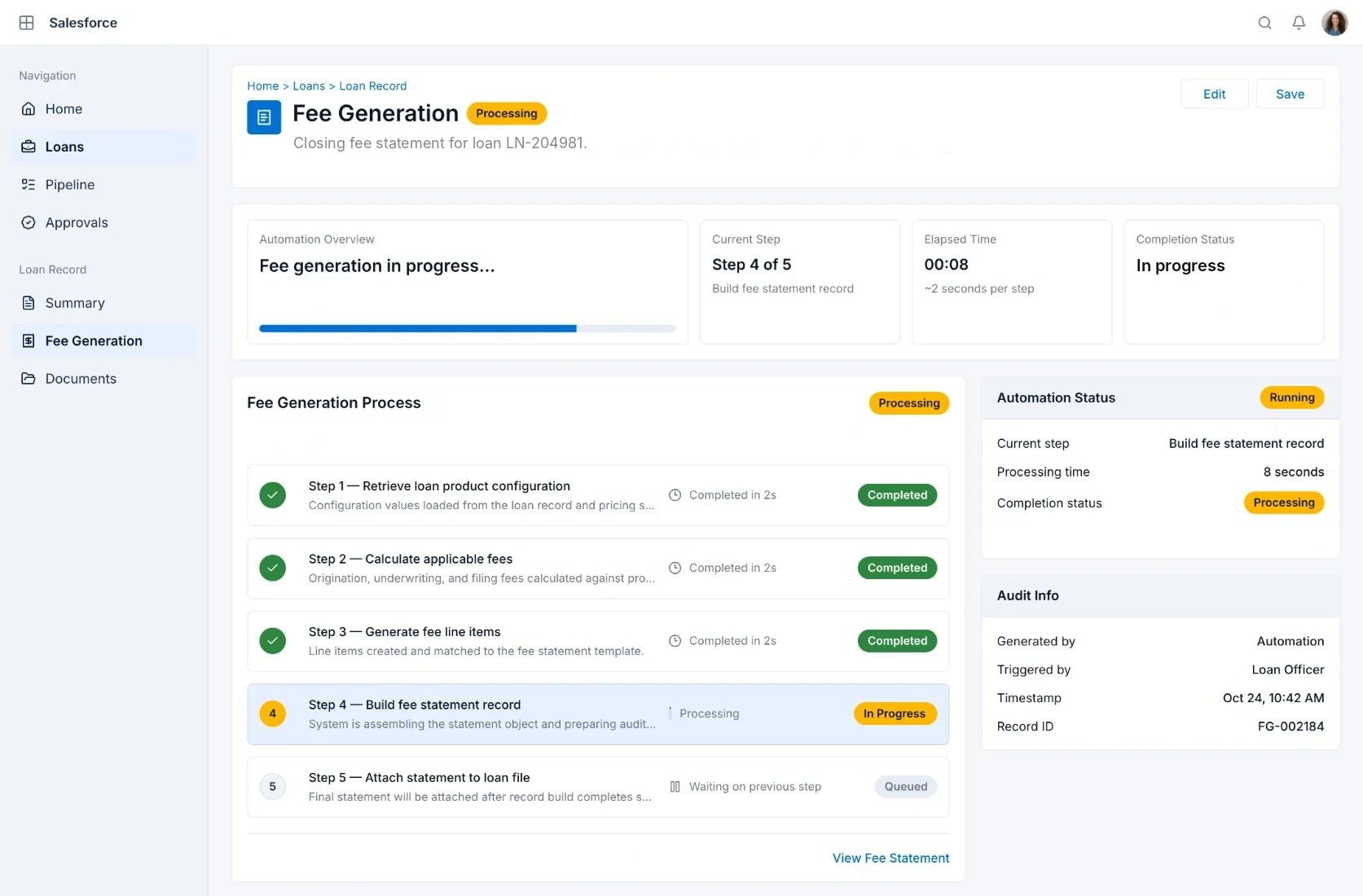
Fee Generation screen
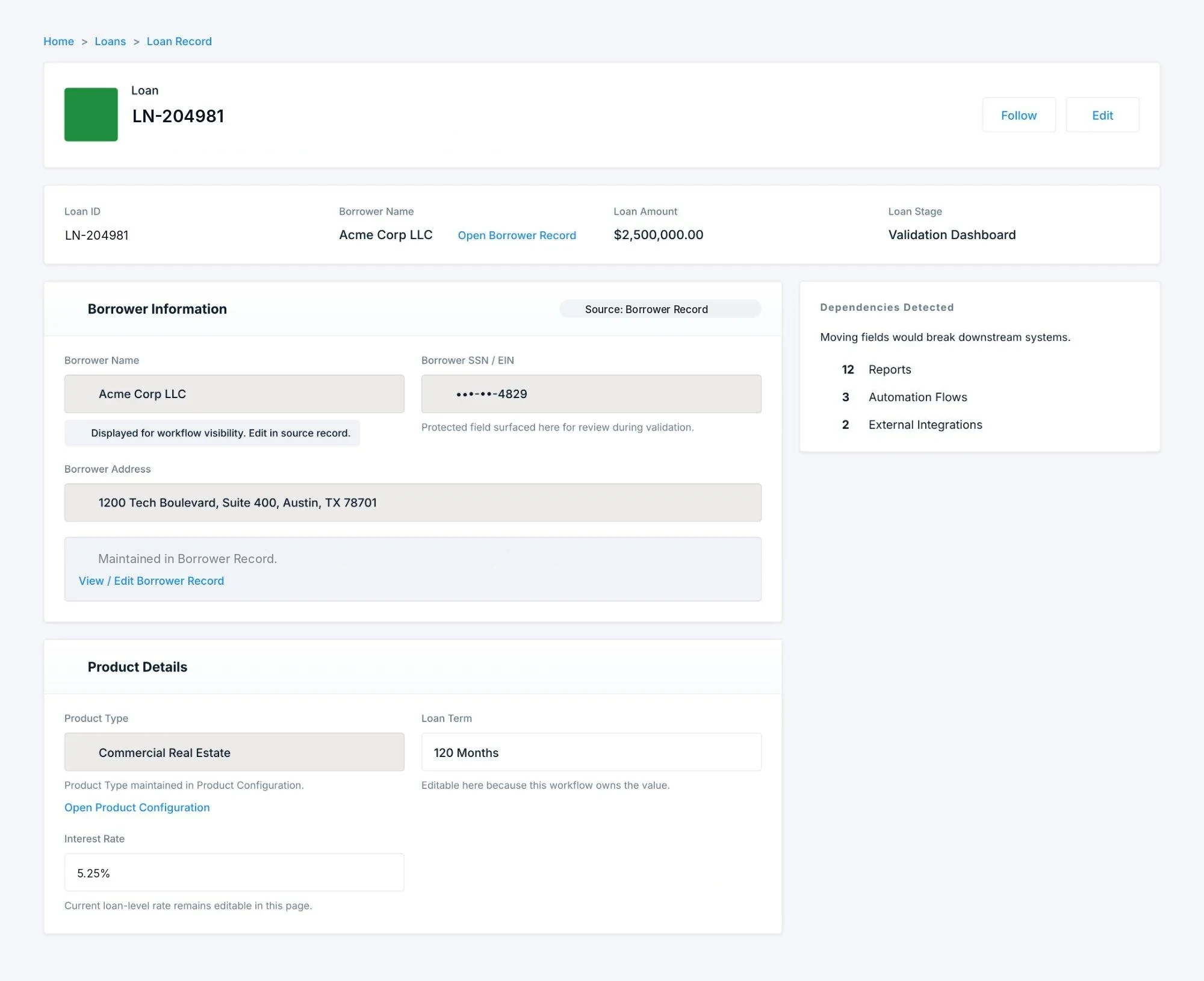
Loan Record screen
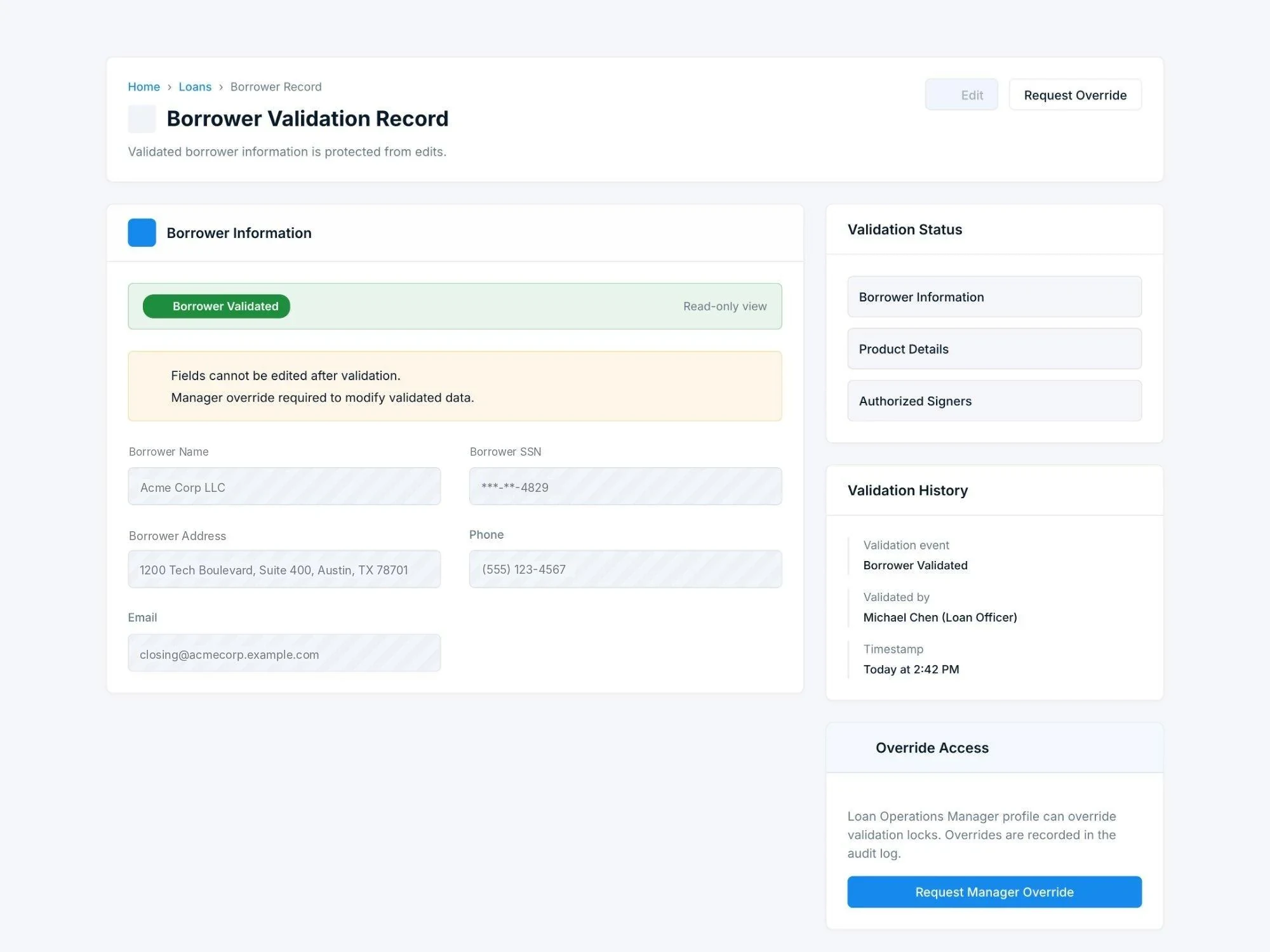
Borrower Validation Record screen

Scroll down inside a screen to see all of it. Use the arrows or scroll sideways for the next screen.1 / 5

Confidential environment — this public version uses redacted visuals. All process logic, dependency patterns, and design decisions are real.

Executive summary

What began as a focused UX review of nCino revealed deeper problems in Comerica’s commercial loan closing process. I redesigned the workflow around document dependencies, clearer ownership, and compliance requirements. The result: closing time dropped from 17 days to 4 days or less, once all required documents were received, with zero compliance findings after implementation.

76%Closing time reduced
17 days → 4 days max, subject to all required documents
2,940Hours saved
annually
99%First-time accuracy
(up from 88%)
94%User satisfaction
(up from 52%)
0Compliance findings
post-change
1.4 FTECapacity
gained
My Role

Sr. Service Designer — discovery, dependency analysis, and solution design. Worked alongside an Operations Director, a Salesforce developer, a compliance officer, and SMEs from the business (the loan closing team). No other designers on the engagement.

What I Did

SME interviews · verification workshop · dependency analysis · future-state design

System

Salesforce Lightning + nCino · AFS · 157-activity enterprise workflow

The domain

What Commercial Loan Closing Actually Is

When a business secures a commercial loan — to buy a building, refinance debt, fund an acquisition — the closing process is what turns an approved credit decision into funded money.

01Borrower validation
02Legal document execution
03Compliance checks
04System of record updates
05Fund disbursement
The system stack
Salesforcethe platform
nCinothe lending application layer
AFScore banking system

At a regional bank handling hundreds of loans simultaneously, all five steps above cross through this stack, across multiple teams. It's complex, high-stakes, and heavily regulated — every step is auditable, and errors don't just slow things down, they create compliance exposure.

Audit sampling found 12%

of completed loans had missed requirements — before this engagement started. That's the number that turns a UX problem into a regulatory one.

Project overview

A scoped ask, not a mandate

The engagement began with a scoped ask, not a mandate: identify incremental UX improvement recommendations inside nCino for the loan closing team. That's a common starting point for a platform like nCino — it's pre-configured by admins and developers against functional requirements, not against how officers actually experience the resulting workflow day to day. By the time I was brought in, officers had enough workarounds built up that leadership wanted a UX read on where the friction was, without committing to touching a live, regulated system based on assumption alone.

Scope

That's what grew a scoped UX review into the full discovery-through-dependency-analysis-through-redesign engagement documented here.

Phase 1Make the current state visible and measurable
Phase 2De-risk redesign by understanding what the architecture would actually allow us to change

What I produced

Six artifacts
01

Current-state journey map

157 discrete activities across 4 stages × 3 channels

02

UPN activity model

WHO / WHAT / WHY / WHERE / OUTCOME for every activity

03

Elements.cloud dependency map

100% of Salesforce dependencies mapped before redesign

04

27-issue root-cause breakdown

Categorized across 3 architecture domains, ranked via dot voting

05

5 production solution builds

Validation Dashboard, automated fee generation, unified console, field locking, dependency-safe field display

06

Future-state workflow

157 → 67 activities across redesigned stages

That's what they asked for. It's not what they needed.

02Research

Mapping 157 activities

Six structured methods, sequenced deliberately — to know more before changing anything.

  1. 02.1Methods
  2. 02.2SME interviews
  3. 02.3Service mapping
Methods & structured exercises

Know more before changing anything

Six structured methods, sequenced deliberately. The goal at each stage was to know more before changing anything — not to move fast and fix problems later in a regulated system.

Method 1

SME Deep-Dive Interviews

2–3 hour workflow reconstruction sessions with officers holding 5–8+ years of end-to-end experience. Real-time mapping so SMEs validated accuracy as we went.

Method 2

4×3 Journey Framework

4 business-milestone stages × 3 channels (Digital, Phone, Manual) — provided structure without overwhelming stakeholders and made redundancy obvious.

Method 3

Verification Workshop

Cross-functional session with 9 LCOs, 5 RMs, 2 Compliance officers. Verified the map, surfaced normalized workarounds, and locked consensus before prioritization.

Method 4

Dot Voting Prioritization

47 issues ranked by impact, frequency, user frustration, and implementation ease. Structured 3-step process forced real tradeoffs rather than gut-feel ranking.

Method 5

UPN Activity Modeling

Universal Process Notation captured WHO / WHAT / WHY / WHERE / OUTCOME for every activity — one notation that served business, technical, and compliance audiences.

Method 6

Elements.cloud Dependency Mapping

OAuth-connected Salesforce metadata analysis mapped all field, Flow, validation rule, Apex, and integration dependencies before any redesign changes were proposed.

SME interviews

2–3 hour mapping sessions

Selected 2–3 subject matter experts with 5–8+ years of closing experience and ran deep mapping sessions — real-time mapping so SMEs validated accuracy as we went, rather than interviewing first and reconstructing the map afterward.

Questions I used
  1. "What's the very first thing that happens once a loan reaches you?"
  2. "What system or screen are you in for that step, specifically?"
  3. "What do you need in hand before you can do this — and where does that come from?"
  4. "How do you know this step is done? What tells you it's time to move on?"
  5. "Who do you hand this to next, and what do they need from you?"
  6. "Have you done something like this earlier in the process already?"
Why this worked: Each question maps to one piece of the activity model — action, system, input, completion criteria, handoff — so the map got built in real time as officers talked, not reconstructed afterward from notes. Question 6 is what caught the redundancy: officers answering it were the ones who first said out loud, unprompted, that they'd already checked this.
What we mapped
  • StagesPost Approval (58 activities), Closing (43), Booking & Review (37), Booked (19)
  • ChannelsDigital (Salesforce/nCino automation), Phone (officer/RM coordination), Manual (human tasks outside system)
  • Output157 discrete activities documented over ~2 weeks of SME sessions
Activity: Validate Borrower InformationSample captured activity
WHO
Loan Officer (manual)
WHAT
Review and confirm borrower name, SSN, address, phone
WHY
Ensure accuracy before generating documents (compliance)
WHERE
Salesforce → Loan Details → Borrower Information section
OUTCOME
Borrower data validated, ready for document generation
Service mapping

The 4×3 structure

The map had four structural layers, stacked to mirror how officers actually experienced the process — not just a diagram, but a working tool with its own anatomy.

Layer 1

Journey stages

Post Approval → Closing → Booking & Review → Booked

Layer 2

Channel perspective

Digital, Phone, Manual — who, and how

Layer 3

Process activities (UPN)

Left-to-right sequence, plain-language actions

Layer 4

System integration

Where each activity happens, and where handoffs occur

Current-state journey map
Current-state loan closing journey map — 4 stages × 3 channels
157 activities across 4 stages × 3 channels. Digital (automated), Phone (coordination), Manual (human tasks). · Kept intentionally small — full map contains proprietary loan process detail covered under NDA.

Stage breakdown

157 activities by channel

Post Approval

58

Assignment, validation, compliance routing, document identification

Digital 22Phone 8Manual 28

Closing

43

Fee generation, document creation, RM coordination, document receipt

Digital 14Phone 9Manual 20

Booking & Review

37

Final validation, compliance review, booking readiness

Digital 11Phone 6Manual 20

Booked

19

System booking, handoff to servicing, archival

Digital 7Phone 3Manual 9
DigitalPhoneManual
Why linear

Why linear, not branching, and why it worked: Branching flowcharts show every decision path and exception — theoretically complete, but unreadable past 50–60 activities. I chose linear instead: left-to-right across three swim lanes (RM, Loan Closing Manager, Loan Closing Officer), the primary happy path — roughly 80% of cases — with exceptions captured separately as pink "pinpoint" annotations. In the verification workshop, officers walked it left-to-right and instantly recognized their own work: one pointed at "Go to Borrowing Structure → Account Details → Addresses" and said "Yes! That's exactly what I do." The same borrower validation appearing four separate times across stages was immediately, visibly obvious — something a branching flowchart would have buried across different paths.

03The problem

27 issues, one checked four times

Comparing the map against the Flow architecture surfaced 27 critical issues across three categories. Then the workshop ranked them.

  1. 03.1Issue identification
  2. 03.2What officers worked in
  3. 03.3Verification workshop
  4. 03.4Prioritization
Issue identification

27 critical issues, three categories

Comparing the current-state journey map against the technical Flow architecture and user observations surfaced 27 critical issues across three categories — before anything was validated with stakeholders.

Manual Handoffs & Routing

9issues
  • 01
    Manual queue assignment3–5 min delay per loan; officers "cherry-picking" easier loans
  • 02
    Manual status updates40% of support tickets were "what's the status of my loan?"
  • 03
    Email-based document exchange15% of loans re-generated documents from outdated versions
  • 04
    Manual system navigationNew users averaged 12 "where do I go next?" questions per loan
  • 05
    Manual service request creation8% of loans had no service request until compliance asked
  • 06
    Manual compliance routing12% of completed loans had missed requirements in audit sampling
  • 07
    Fragmented document requestsBorrowers averaged 3.2 separate document interactions per loan
  • 08
    Manual missing-info tracking25% of loans had 2+ back-and-forth cycles for "one more thing"
  • 09
    Manual fee disbursement sending18% sent 24+ hours after generation

Redundant Validation

12issues
  • 10
    Duplicate borrower validationSame fields validated in 4 separate activities
  • 11
    Repeated product validationOld validation retained when new validation added
  • 12
    Multiple authorized signer checksSigners validated at 4 different points, 4–6 min each
  • 13
    Redundant compliance checks"We see the same loan 3 times" — compliance officers
  • 14
    Duplicate fee validationSame fees validated 3× across touchpoints, 15 min per loan
  • 15
    Repeated completeness checks"Review" appears 8+ times with no definitive complete state
  • 16
    Multiple collateral validationsSame documents reviewed 3–4 times
  • 17
    Recurring missing-info loops40% of loans return to earlier stages for missing information
  • 18
    Duplicate routing verificationsSame routing decision validated twice
  • 19
    Multiple status confirmationsSystem logs already showed status correct; step unnecessary
  • 20
    Redundant structure reviewsBorrowing structure reviewed 3 times, rarely changed between
  • 21
    Repeated entity validations85% of loans had zero entity changes after Post Approval

System Fragmentation

6issues
  • 22
    Disconnected system viewsOfficers kept multiple browser tabs open to avoid re-navigating
  • 23
    Manual data re-entry across systems8% of loans had mismatched data between nCino and AFS
  • 24
    Email as system of recordCompliance audit required manual email search to reconstruct decisions
  • 25
    Document repository fragmentation20% of closing delays traced to "can't find the document"
  • 26
    Service request system separate from workflowStatus lag averaged 2–3 days behind actual progress
  • 27
    Reporting requires manual data collectionManagers spent 5–10 hours/week collecting status manually
Current state

What officers worked in, issue by issue

The screens loan closing officers worked in before the redesign, one per issue. Visuals are redacted.

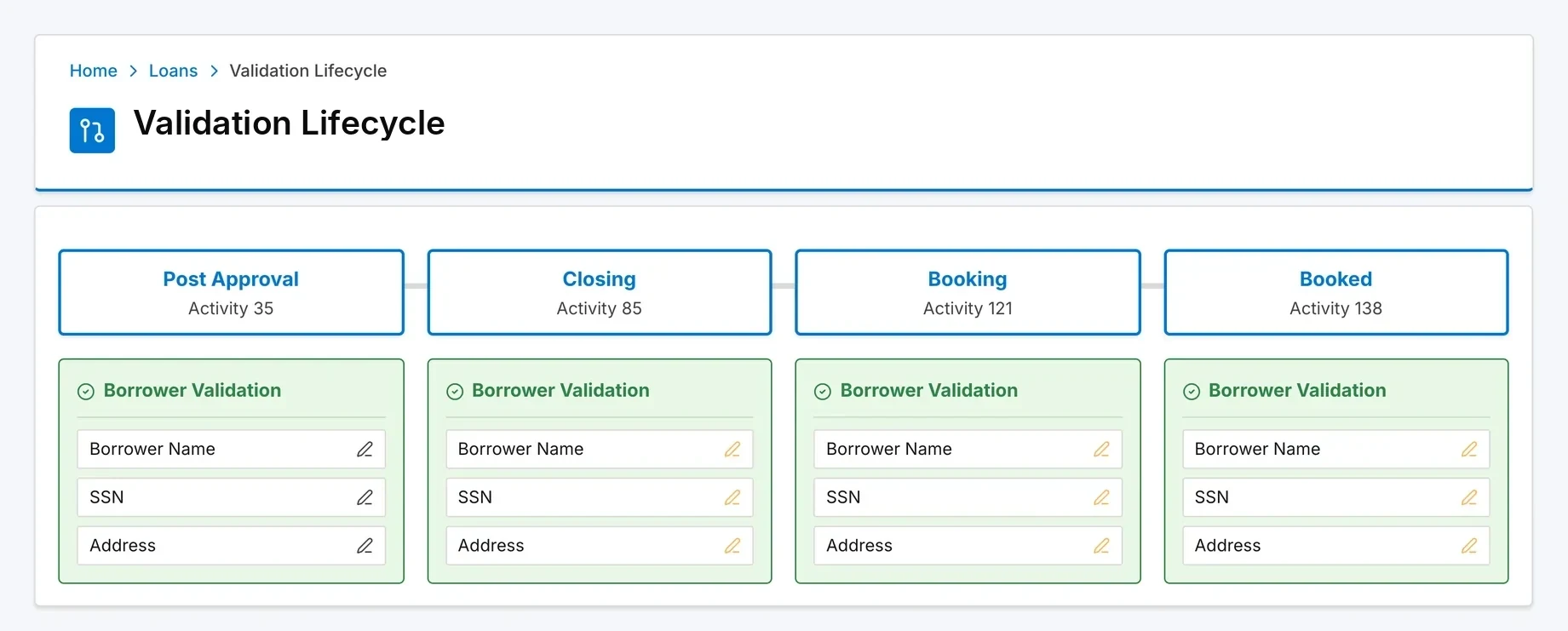
Validation workflow analysis: borrower name, SSN and address validated at Post Approval, Closing, Booking and Booked — activities 35, 85, 121 and 138
Top issue #1 · Redundant Validation

The same borrower, validated four times

Same fields validated in 4 separate activities: Post Approval, Closing, Booking & Review, and Booked. 8–12 min per loan, every loan affected.

Product and collateral checks repeated 3×, authorized signers 4×.

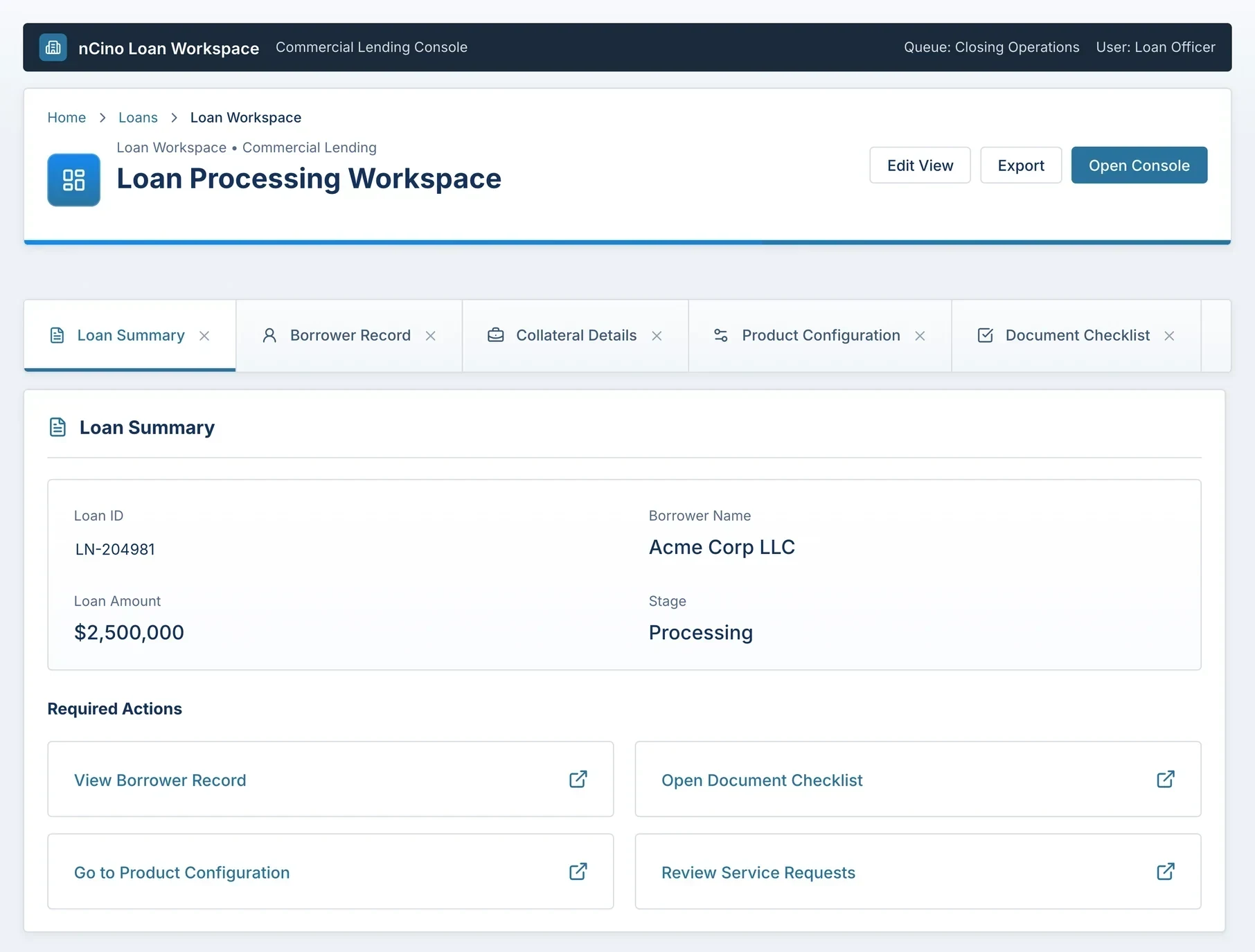
Loan Processing Workspace: loan data split across tabs — 18 navigation steps per loan, 12 seconds per screen switch, 3.6 minutes overhead per loan
Top issue #6
18 screen jumps per loan3.6 min overhead and a 6-week training curve for new officers.
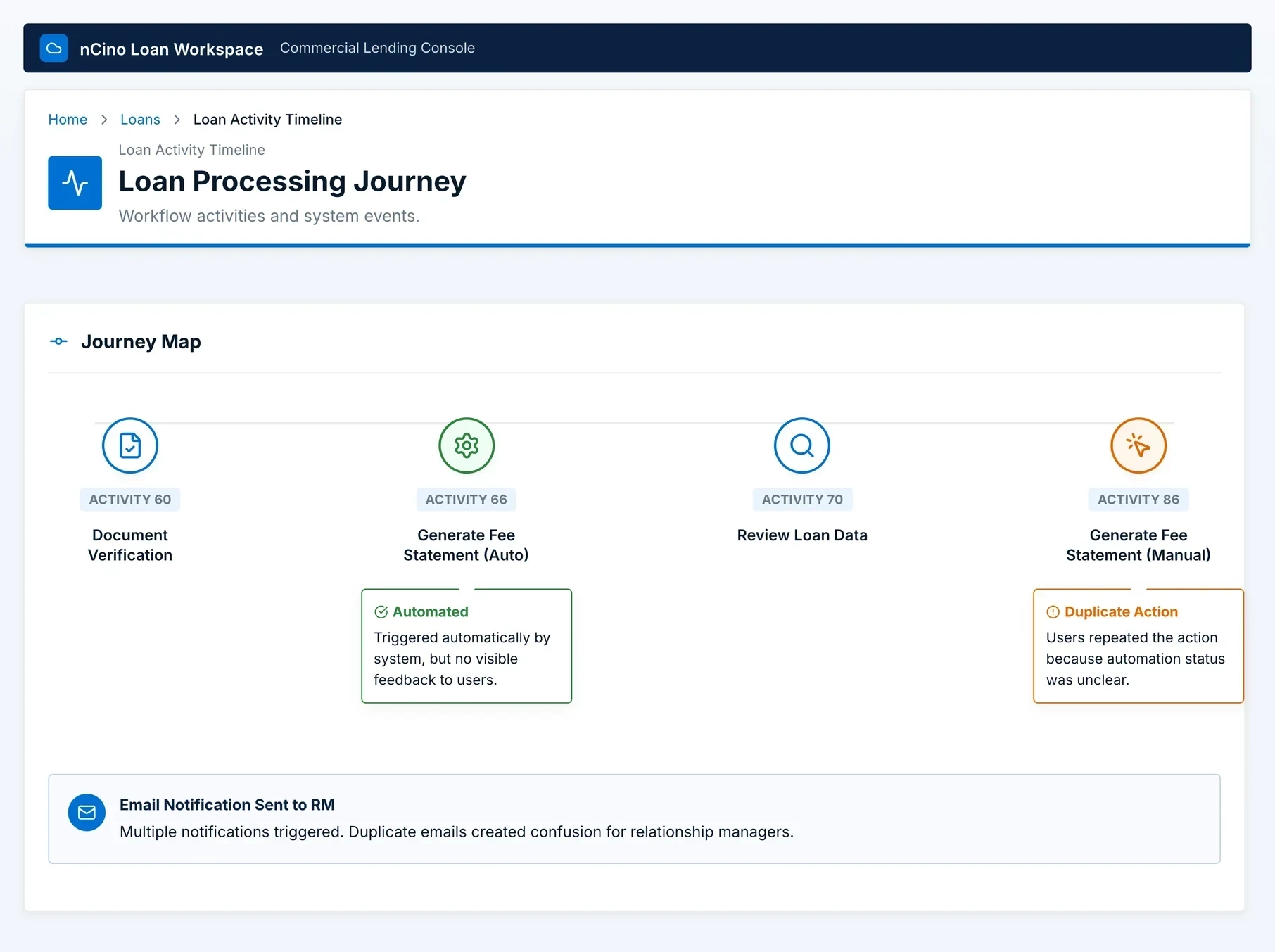
Loan Processing Journey: activity 66 generates the fee statement automatically with no visible feedback; activity 86 repeats it manually
Top issue #5
Fee statement generated twiceAutomated at activity 66, silent, so officers pressed the button again at activity 86.
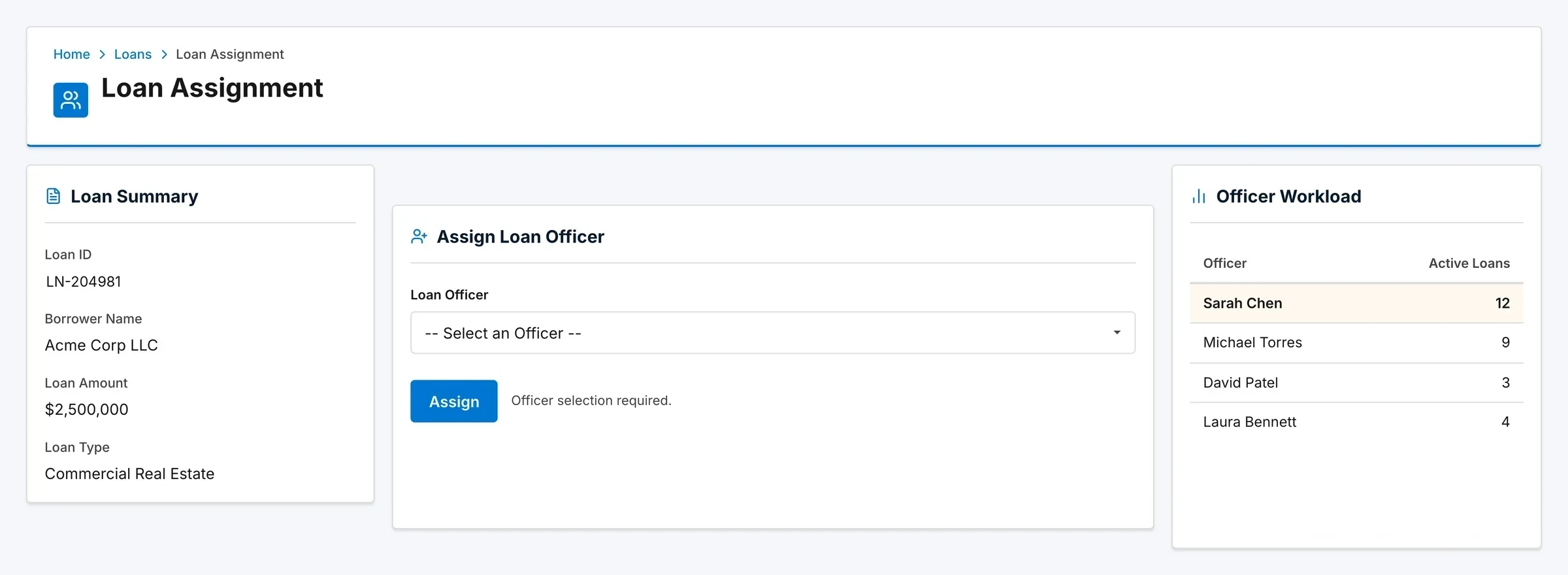
Loan Assignment: a plain officer dropdown; the officer workload table shows 12, 9, 3 and 4 active loans
Top issue #2
Manual queue assignment3–5 min delay per loan; officers "cherry-picking" easier loans.
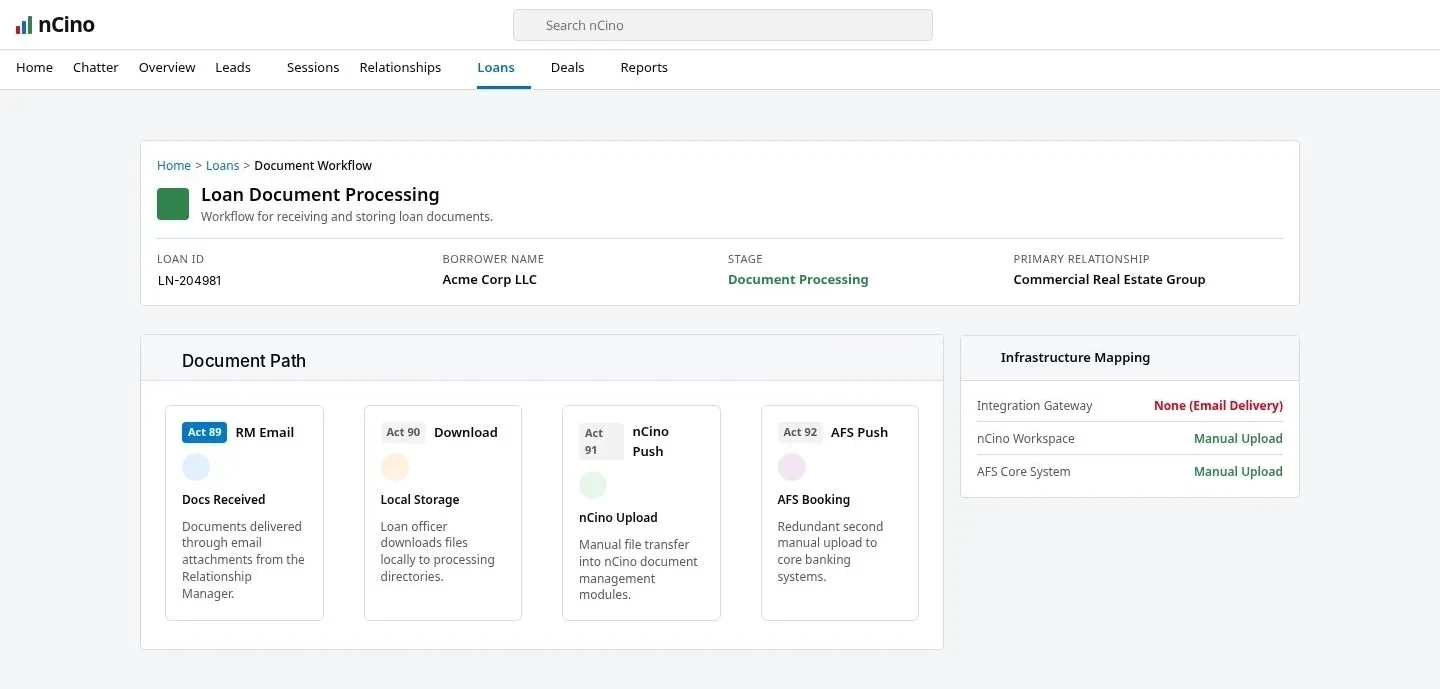
Loan Document Processing: documents move by RM email, local download, nCino upload and AFS upload — activities 89 to 92 — with a 15% version confusion rate
Top issue #3
Email as the integration layerRM emails, officer downloads, uploads to nCino, uploads to AFS. 15% version confusion.
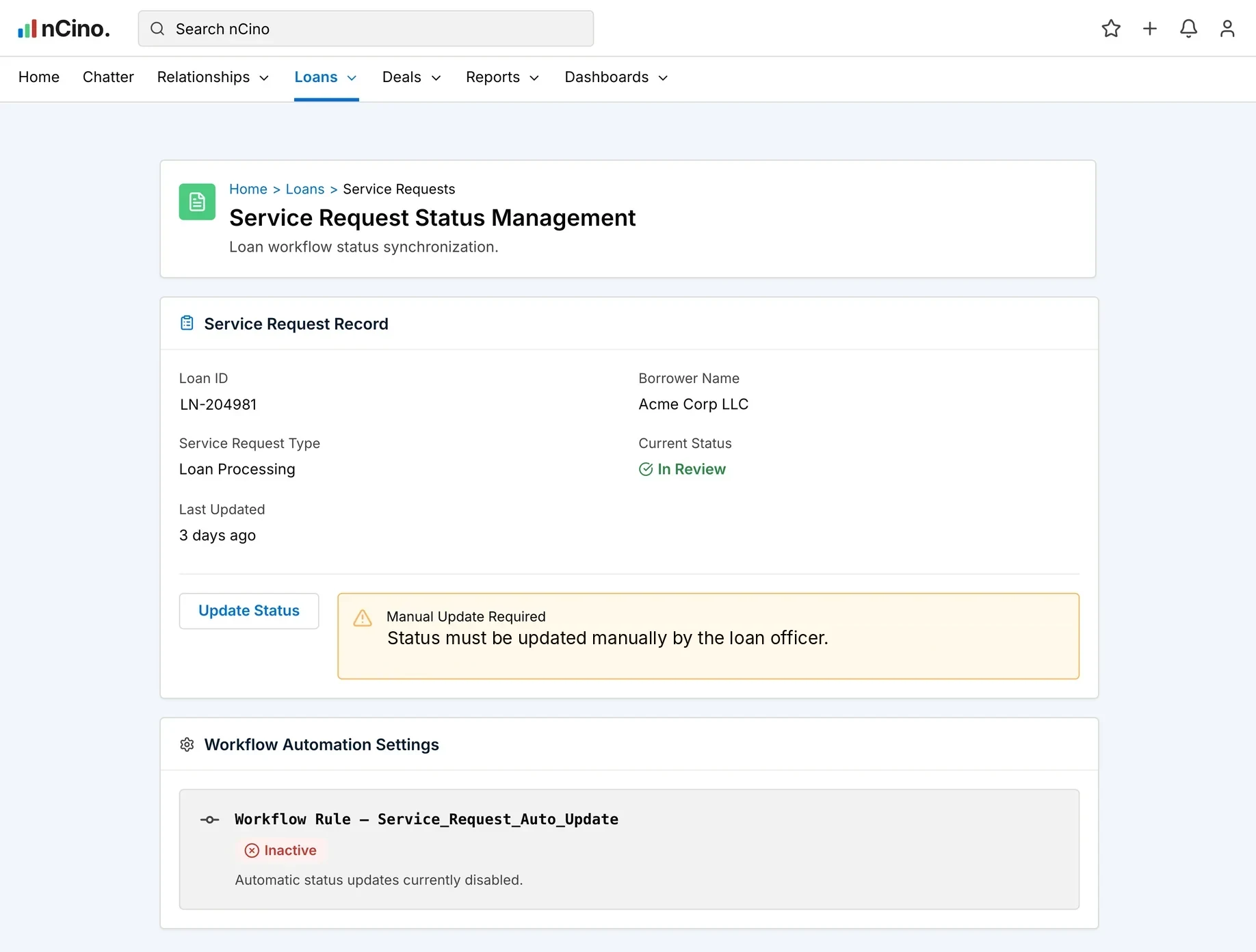
Service Request Status Management: the auto-update workflow rule is inactive; 42% status update forget rate, 2–3 day status lag, 1,270 support tickets in Q1
Top issue #4
Status updated by hand42% forget rate, 2–3 day lag, 1,270 support tickets in Q1.
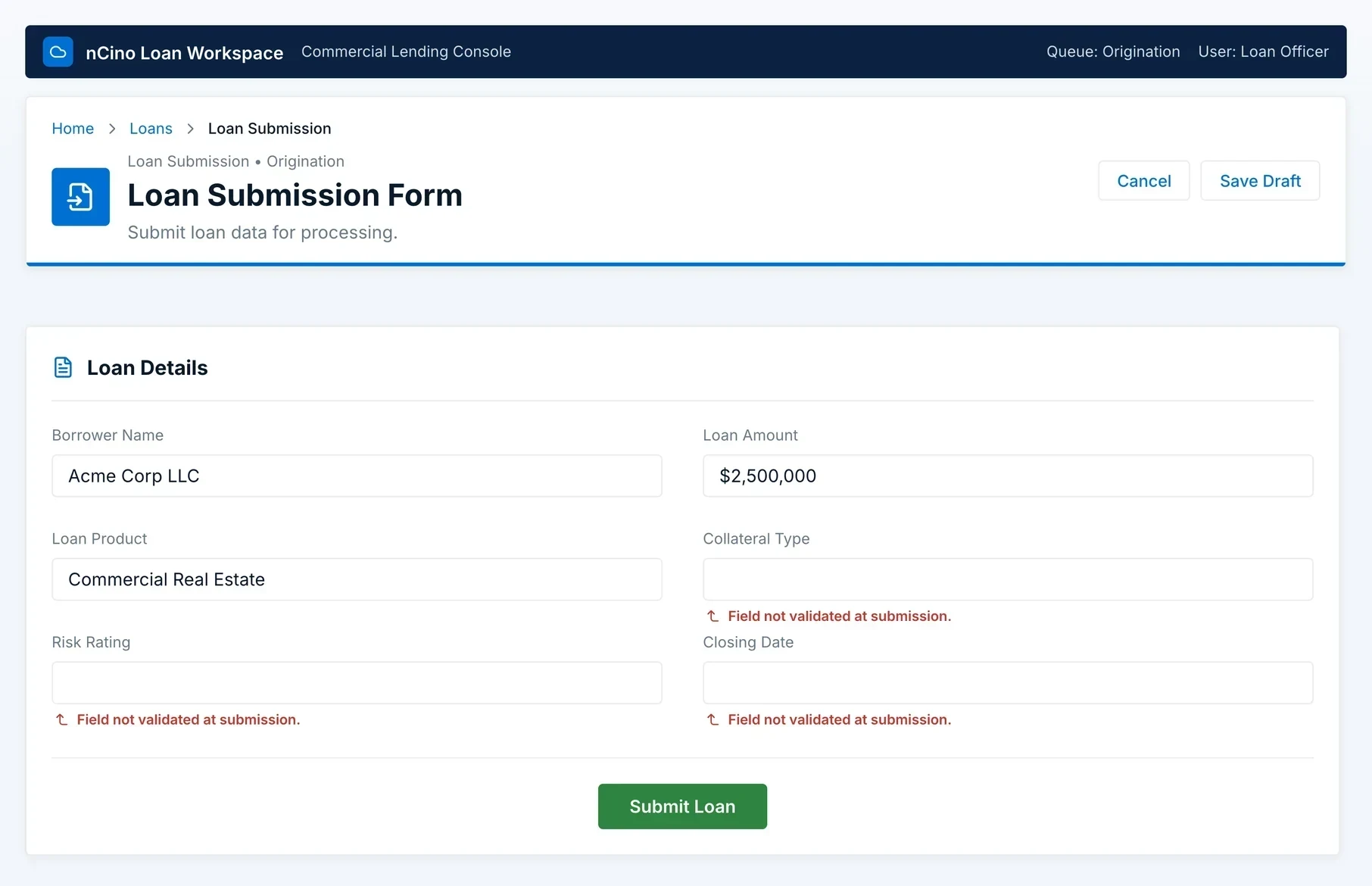
Loan Submission Form: collateral type, risk rating and closing date not validated at submission; 40% of loans looped back for rework
Issue 17
Missing information found late40% of loans return to earlier stages for missing information.
Workflow verification workshop

Locking consensus

I ran a structured verification workshop to confirm the map, surface missed steps, and expose workarounds that SMEs had normalized. This is where the organization stopped debating what was happening and started debating what to fix.

Participants + purpose
  • 9Loan Closing Officers — primary users of the workflow
  • 5Relationship Managers — external stakeholders in the process
  • 2Compliance Officers — audit and regulatory perspective
100%Stakeholder agreement on current state
98%Issues were previously unknown to the team
100%SMEs confirmed the map was accurate
What the workshop revealed

01Automation uncertainty — officers duplicating automated work

Fee statement generation appeared twice on the map: Activity 66 (system automation) and Activity 86 (manual button press).

"Wait, the system does it automatically? I always click the button."

Officer — workshop discovery moment

Multiple officers immediately confirmed: "Me too. I didn't know it was automatic."

02Email as the integration layer — 15% version confusion rate

Activities 89–92 mapped the real document path: RM emails documents → officer downloads → officer uploads to nCino → officer uploads to AFS. Workshop estimate: 15% of loans had document version confusion ("which emailed version was executed?").

03Workarounds normalized into "process"

"I don't trust the system to remember things, so I keep my own notes."

Officer — workshop quote

Post-it notes tracking loan progress, personal notebooks listing validation items, and email searches to find information that should live in the system had become standard practice.

Prioritization exercise

How decisions were made

The workshop surfaced 47 individual pain-point annotations. I consolidated these into 27 root-cause issues across three categories — Manual Handoffs & Routing (9 issues), Redundant Validation (12 issues), and System Fragmentation (6 issues) — since many pinpoints were different symptoms of the same underlying problem. I then facilitated a structured prioritization exercise on those 27 issues to determine what to address first — before anyone knew yet what the architecture would actually allow.

Criteria 1

Impact

Time or cost consumed; measurable business impact

Criteria 2

Frequency

Every loan, weekly, monthly, or rare edge case?

Criteria 3

User frustration

Stress and dissatisfaction created for officers

Criteria 4

Implementation ease

Effort + technical complexity given dependency constraints

Step 1Dot Voting

Each stakeholder received 10 votes to distribute across 47 issues. Votes could be stacked on critical items or spread across multiple issues.

Step 2Group Discussion

Facilitated discussion about top vote-getters to understand reasoning and validate consensus. Dependency analysis findings were presented to reframe some issues that looked "easy" but were architecturally risky.

Step 3Final Ranking

Operations Director reviewed team input and created the final ranking based on strategic alignment, implementation feasibility, and dependency safety (informed by Elements.cloud data).

Top Prioritized Issues

Top 10 of the 27 root-cause issues, ranked by dot voting and Operations Director review.
#1

Redundant borrower validation (4×)

8–12 min per loan/Every loan affected/Clear process waste/Dependency-safe to consolidate

High impact
#2

Manual loan assignment

3–5 min per loan/Workload imbalance/Fix requires connecting existing fields

High impact
#3

Email-based document exchange

15% version confusion/Security risk/2.5 minutes per exchange

High impact
#4

Manual status updates

42% forget rate/2–3 day status lag/Fix is re-enabling disabled automation

#5

Fee generation duplication

API failures/Relationship manager confusion/Remove manual button after dependency confirmation

#6

Excessive navigation (18 jumps)

3.6 min overhead/High cognitive load/6-week training curve for new officers

#7

Compliance routing inconsistency

12% error rate in audit sampling/Regulatory risk, not just delay/No rules engine for review type

Compliance risk
#8

Manual service request creation

8% miss rate in audits/Compliance gaps/Process inconsistency

#9

Fragmented document requests

3–4 separate requests per loan/Borrower confusion/Workflow delays

#10

Normalized workarounds

Post-its and notebooks/Systemic fragility/Training burden for new officers

Ranked. Ready to act. The top priority looked simple enough to just do.

04The pivot

"If we change this, what breaks?"

The "quick win" that forced a dependency-first approach.

  1. 04.1The quick win
  2. 04.2The critical gap
  3. 04.3Architecture analysis
  4. 04.4Five root causes
Pivot trigger

The "quick win" that forced a dependency-first approach

Why these findings weren't enough to act on

Issue #1 on the ranked list: consolidate the four redundant borrower validations into one. It was the top priority for a reason — every loan affected, 8-12 minutes wasted each time. Stakeholders agreed. The Operations Director was ready to act. It looked simple enough to just do.

"These 4 redundant borrower validations — can we just consolidate them into 1? That seems like an obvious fix."

Operations Director
The problem

Traditional UX could document pain but couldn't answer: "If we change this, what breaks?" That question stopped everything.

The development response that changed everything

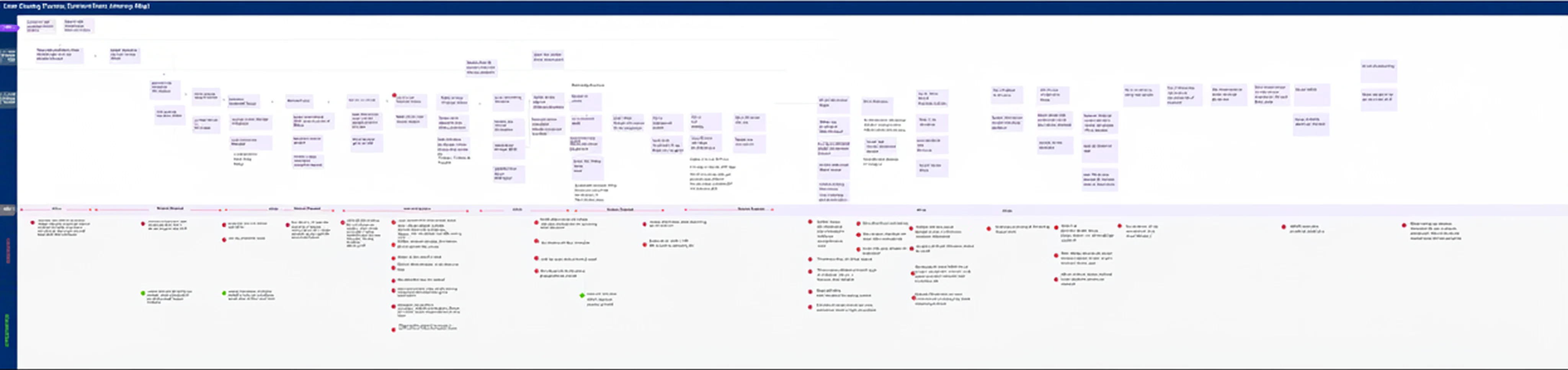
Engineering pulled up Flow Builder to start tracing what each validation actually did. What appeared on screen was a massive horizontal canvas with 60–80+ Flow elements, illegible at standard zoom. The developer's response ended the "quick win" conversation:

"Which validations specifically? I see one at Post Approval, another at Closing... but we don't know what depends on each validation. Does validation #2 set a field that a downstream nCino process expects? Does validation #3 trigger an API call another system depends on? To know what's safe to remove, we'd have to manually review every Flow, every validation rule, every Apex class, every report. That would take weeks — and we'd probably still miss hidden dependencies."

Developer — after opening Flow Builder

The real constraint underneathThe system was tightly coupled: Salesforce, nCino, AFS — all interconnected. Five years of layered development by different teams meant:

2018Base logic
2020nCino integration added
2021–2022AFS + developer additions
44A single field, the loan's Stage, had 44 dependent components: validation rules, Flows, reports, nCino integration, Service Request system. "If we change the picklist values, I honestly don't know what would break."

The decision

Service mapping gave us

  • Complete process visibility (157 activities)
  • Pain-point inventory (47 issues)
  • Performance baselines
  • Stakeholder buy-in

But it couldn't prove

  • Why redundancy exists (architectural history)
  • What depends on what across components
  • What breaks if something changes
  • What capabilities exist but aren't used
  • Why automation was disabled

So I switched tools

  • UPN — one notation for business, tech, and compliance
  • Elements.cloud — Salesforce metadata dependency analysis
  • Dependency-first triage before proposing any solution
See what dependency analysis revealed →
Where research stopped

The Critical Gap

After the journey map and workshop, I had strong stakeholder buy-in, a validated pattern set, and a prioritized issue list. But I couldn't answer the question that would determine success or failure: "If we consolidate these four validations into one, what breaks downstream? If we automate this manual assignment, does the capability already exist in the codebase? If we eliminate navigation steps by consolidating screens, what system dependencies exist that we can't see?"

The limit

Traditional UX research methods — interviews, journey mapping, workshop validation — had reached their limit. I could see the symptoms: redundancy, manual work, fragmentation. I couldn't see the root causes (why the system was built this way) or the constraints (what was actually safe to change). Dependency analysis wasn't there to impress developers. It was the only way to get from "here's the problem" to a design the system could actually support.

Architecture analysis

UPN + Elements.cloud

I used UPN to model every activity in terms that all audiences could understand, then used Elements.cloud to map how every object, field, Flow, rule, and integration depended on each other. The question both tools answered: "If we change this, what breaks?"

UPN — one notation for business, tech, and compliance

Universal Process Notation captured five elements per activity. Stakeholders understood WHO/WHAT/WHY/OUTCOME. Technical teams understood WHERE. Compliance saw accountability.

ElementDescriptionExample
WHOActor performing the activity — human role or system automationLoan Officer (manual) / System (automated)
WHATSpecific action in plain language, clear and actionable"Review and confirm borrower name, SSN, address, phone"
WHYBusiness purpose or compliance requirement"Ensure borrower data matches credit approval (compliance)"
WHEREExact system location — Salesforce object, screen, field, or external systemSalesforce → nCino Loan Details → Borrower Information section
OUTCOMEWhat changes, what's produced, what state progresses"Borrower data validated and locked; loan moves to Booking"
Why it mattered

Because every activity named its WHERE, we knew which part of Salesforce sat behind each step, which made the dependency mapping much faster.

Four readings

Why it mattered for cross-functional communication: The same diagram went to four different audiences without a translation layer. Executives read it as a high-level journey. Officers read it as "what do I need to do." Developers read it as "what do I need to build." Compliance read it as an audit trail. I never had to maintain separate documentation for each — one artifact, four legitimate readings, no version drift between them.

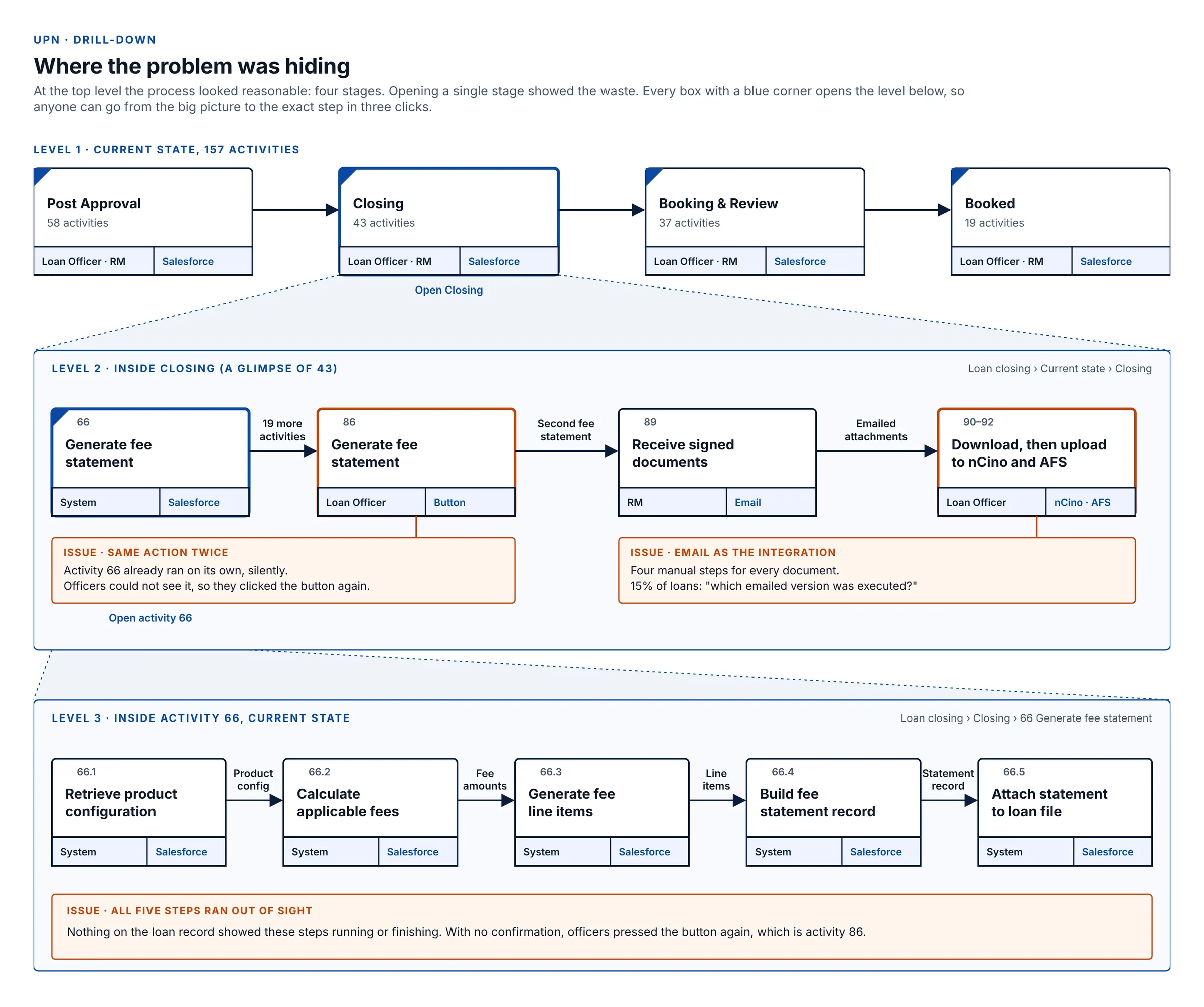
UPN drill-down in three levels of the current state: the four stages, inside Closing where the fee statement ran twice and documents moved by email, and inside activity 66 where its five system steps ran out of sight
Why drill-down mattered: the top level looked fine. Opening Closing showed the same fee statement run twice and documents moving by email. Opening activity 66 showed why: all five steps ran with nothing on screen to confirm them.

Why UPN over a standard flowchart

Single shape philosophy

Only activity boxes, no diamonds or special shapes. Decisions are shown as multiple arrows leaving a box with conditions labeled on each — one visual language instead of a decision-tree grammar only technical readers parse easily.

Hierarchical drill-down

Top level shows 8–10 boxes; each box drills into further detail. Keeps the diagram readable at a glance while allowing unlimited depth underneath.

Business-readable

The same diagram works for executives, officers, developers, and auditors. No separate "technical version" and "business version" to keep in sync.

Outcome-driven

Every activity box has to answer "how do we know this step is complete?" Not "Process loan" but "Process loan → validated, credit pulled, underwriting complete."

System context

Each activity tagged with which system handles it (Salesforce, nCino, email, manual), making integration points and handoffs visible at the notation level.

Standardized in the Salesforce ecosystem

UPN is part of Business Analyst certification and Certified Technical Architect review, so it wasn't a bespoke notation I invented for this project.

What Elements.cloud revealed

Two root causes
Root cause 1

Manual routing: capability existed but was never connected

Loan assignment was fully manual — no workload balancing, no specialization matching, 3–5 minutes per loan. Senior officers cherry-picked easy loans.

Elements revealed the User object already had the fields needed for intelligent routing:

Already on every officer's profileWhat it held
SpecializationCommercial, Construction or Real Estate
Certification levelJunior, Standard or Senior
Current workloadNumber of active loans
Maximum capacityMost loans the officer can handle
How assignment actually worked (last updated 2018)
A plain dropdown of every active officer. No rules, no matching, no workload check.
The fields were created in 2020. The assignment Flow was last updated in 2018. Nobody connected them. Result: time waste, cherry-picking, workload imbalance — and the fix required zero new data modeling.
Root cause 2

Automation disabled — wrong problem diagnosed

42% of officers forgot to manually update service request status during observation. Status lagged actual loan progress by 2–3 days. 1,270 support tickets in Q1. Elements surfaced the reason:

Status auto-update rule
BuiltJune 2018
What it didUpdated the service request status whenever the loan changed stage
StatusSwitched off in March 2019
Note left when it was switched off
"Disabled per user feedback — too many email notifications. Users receiving 15-20 emails per loan. Status updates now manual until we implement better notification strategy."
The real problem was notification design, not automation. Users complained about email fatigue. The fix was to disable blanket notifications and send only on major milestones. Instead, the automation itself was turned off — creating 882 hours of annual manual work and a 42% status-update miss rate.
The real root causes

Five Architectural Patterns

Pattern 1

Capability exists, not integrated

Built features never wired into workflows. Users did manually what the system could automate.

Pattern 2

Automation disabled, wrong problem diagnosed

Notification fatigue treated as automation failure. Automation disabled instead of notification design fixed.

Pattern 3

Invisible automation creates duplication

Fee generation automated but silent. Users duplicated the action because they couldn't see system state.

Pattern 4

Layers preserved, not consolidated

5 years, different developers, each adding without removing. Redundant paths coexisted due to fear of breakage.

Pattern 5

Tightly coupled dependencies prevent change

44 components depended on the loan's Stage field. Small changes carried outsized, unpredictable risk.

Strategic insight

Many "UX problems" were really system decisions that forced people into slow workarounds. Polishing screens wouldn't fix them. The system itself had to change, guided by what depended on what. Without dependency analysis, I would have designed solutions I wished worked — not solutions the architecture could actually support.

05The solution

Shipping safely inside nCino

Designed to ship safely. With dependencies mapped, I translated root causes into shippable solution modules.

  1. 05.1Design principles
  2. 05.2157 → 67 activities
  3. 05.3Decision log
  4. 05.4The screens
  5. 05.5Fields & net effect
Derived from 27 prioritized workflow issues identified during research

Five Design Principles

Derived from highest-priority workflow issues discovered during research and process mapping.

01

Intelligent automation over manual routing

Automate decisions that follow clear business rules. Reserve human judgment for genuine ambiguity.

02

Validate once, trust always

Consolidate validation into a single comprehensive gate. Eliminate redundant checks downstream.

03

Integrated workflow over system hopping

Bring information to users rather than sending users to information. Reduce tab switching and context loss.

04

Proactive over reactive

Surface missing fields early. Make next steps obvious without asking or requiring manual discovery.

05

Real-time visibility over status polling

All stakeholders see current state automatically. Eliminate "where are we?" inquiries and manual updates.

157 → 67

The redesigned process cuts 157 activities to 67, across the same four stages.

Post Approval

Was 5822
62% reduction

Closing

Was 4318
58% reduction

Booking & Review

Was 3715
59% reduction

Booked

Was 1912
37% reduction
Key design decisions

Working within Salesforce + nCino constraints

Because nCino runs inside Salesforce as a managed package, design work focused on reorganizing existing fields, screens, and components — not building custom UI from scratch. Field placement, visibility rules, grouping, and consolidation using Lightning App Builder and safe extension patterns.

Decision log

Seven decisions, each checked against the dependency map before it shipped
DecisionWhat shippedProblem it fixedDependency check

What shippedOne Lightning page, three sections, one "validated" check each

Problem it fixedSame fields validated in 4 separate activities

Dependency checkDependency-safe to consolidate

What shippedRead-only display with a deep link to edit at the source

Problem it fixedOfficers re-entering Borrower and Product data

Dependency check12 reports, 3 Flows, 2 integrations kept intact

What shippedEmbedded Screen Flow showing each step as it runs

Problem it fixedFee statement generated twice (activities 66 and 86)

Dependency checkButton removed after zero downstream references confirmed

What shippedSingle page, default for Loan Closing Officers

Problem it fixed18 screen jumps, 3.6 min per loan

Dependency checkExisting components rearranged, no fields moved

What shippedValidated sections lock, with a logged manager override

Problem it fixedChecked data could still change later

Dependency checkEvery override recorded in the audit log

What shippedAssignment Flow reads existing officer fields

Problem it fixedManual queue assignment and cherry-picking

Dependency checkZero new data modeling required

What shippedStatus rule back on, milestone-only notifications

Problem it fixed42% status-update miss rate, 2–3 day lag

Dependency checkNotification design fixed, not automation removed
The screens

Before and after, decision by decision

Each decision shows the screen that shipped, next to the screen it replaced.

Decision 01

Validation Dashboard — scattered checks → 1 unified view

Borrower validation was scattered across multiple separate tabs and screens. Created a single "Validation Dashboard" Lightning page with grouped sections and validation state flags visible at a glance.

  • Section 1: Borrower InformationName, SSN, address, phone, email. Two-column layout, with a "Borrower validated" checkbox.
  • Section 2: Product DetailsProduct type, loan amount, interest rate, loan term, with a "Product validated" checkbox.
  • Section 3: Authorized SignersThe signer list, brought in from its own screen, with a "Signers validated" checkbox.
BeforeSame fields validated in 4 separate activities
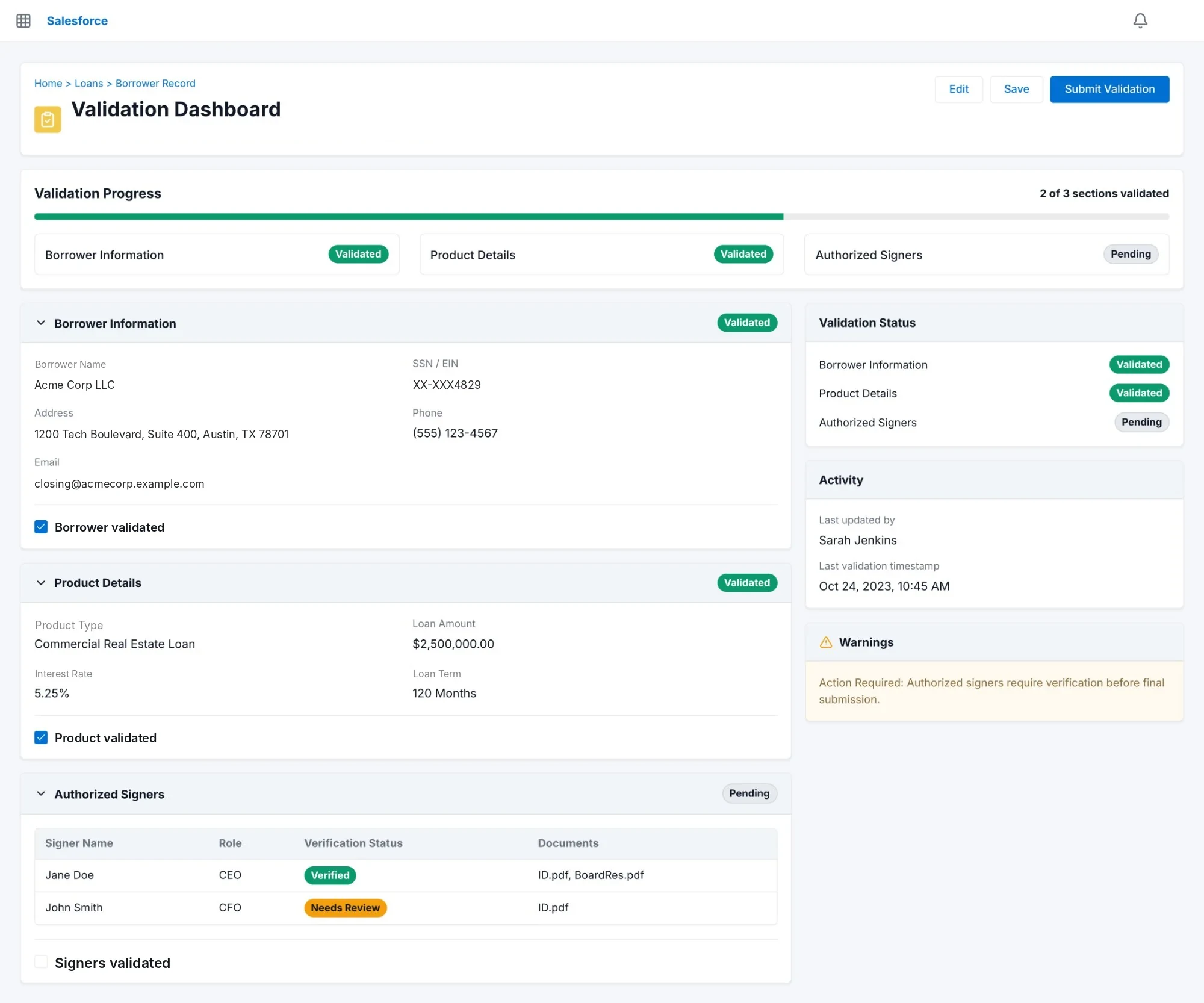
Validation Dashboard — borrower validation consolidated into 1 unified workflow showing borrower information, product details, and authorized signers with validation state indicators
AfterWhy one view: officers checked the same borrower data in four places. Now each section has one check, and missing items show on the page instead of downstream.
Decision 02

Read-only surfacing where fields can't be moved — canonical location preserved

Elements showed 12 reports, 3 automation flows, and 2 external integrations queried Borrower and Product fields at their canonical location. Moving them would break all downstream references. Decision: keep canonical storage intact, surface read-only in the Validation Dashboard with a deep link to edit at the source. Officers verify instead of re-entering — zero report queries broken.

This wasn't a blanket "lock everything" rule — it's mixed-mode by design. Borrower Name, SSN, and Address stay read-only because Borrower Record owns them. Loan Term and Interest Rate stay directly editable in this same screen because the closing workflow owns those values. SSN is also masked on display (•••-••-4829) as a baseline PII-handling pattern.

Open item: Risk Rating fields being manually re-keyed instead of pulling from credit is a separate, real problem this decision doesn't solve — there's no dependency-safe fix documented for it yet.
Read-only surface pattern showing dependency-safe field display for borrower and product fields — canonical source labeling, deep links to edit, mixed editable/read-only mode, and dependency panel listing 12 reports, 3 flows, 2 integrations
AfterWhy read-only: moving these fields would have broken 12 reports, 3 Flows and 2 integrations. Officers see them here and edit at the source. Fields this workflow owns stay editable.
Decision 03

Fee generation — make automation visible, remove duplicate manual action

Fee generation was automated but invisible — officers duplicated it manually because they couldn't see it running. Added an embedded Screen Flow component showing each step as it executes with a 2-second pause per step, making the process visible and auditable. Removed the "Generate Fee Statement" Quick Action button after Elements confirmed zero downstream references. Officers no longer double-click a button hoping it worked.

Each run captures Generated By, Triggered By, Timestamp, and a Record ID in the audit trail — and includes a defined Error/Exception state for failed runs, not just a Processing/Completed pair, so a failure surfaces as a recoverable state instead of a silent stall.

BeforeGenerated automatically at activity 66, again by hand at activity 86
Fee Generation screen — embedded Screen Flow showing 5-step automation progress: retrieve config, calculate fees, generate line items, build statement record, attach to loan file — with real-time step status and audit info
AfterWhy show the steps: fee generation already ran on its own, but nobody could see it, so officers clicked the button again. Showing each step ended the duplicate run.
Decision 04

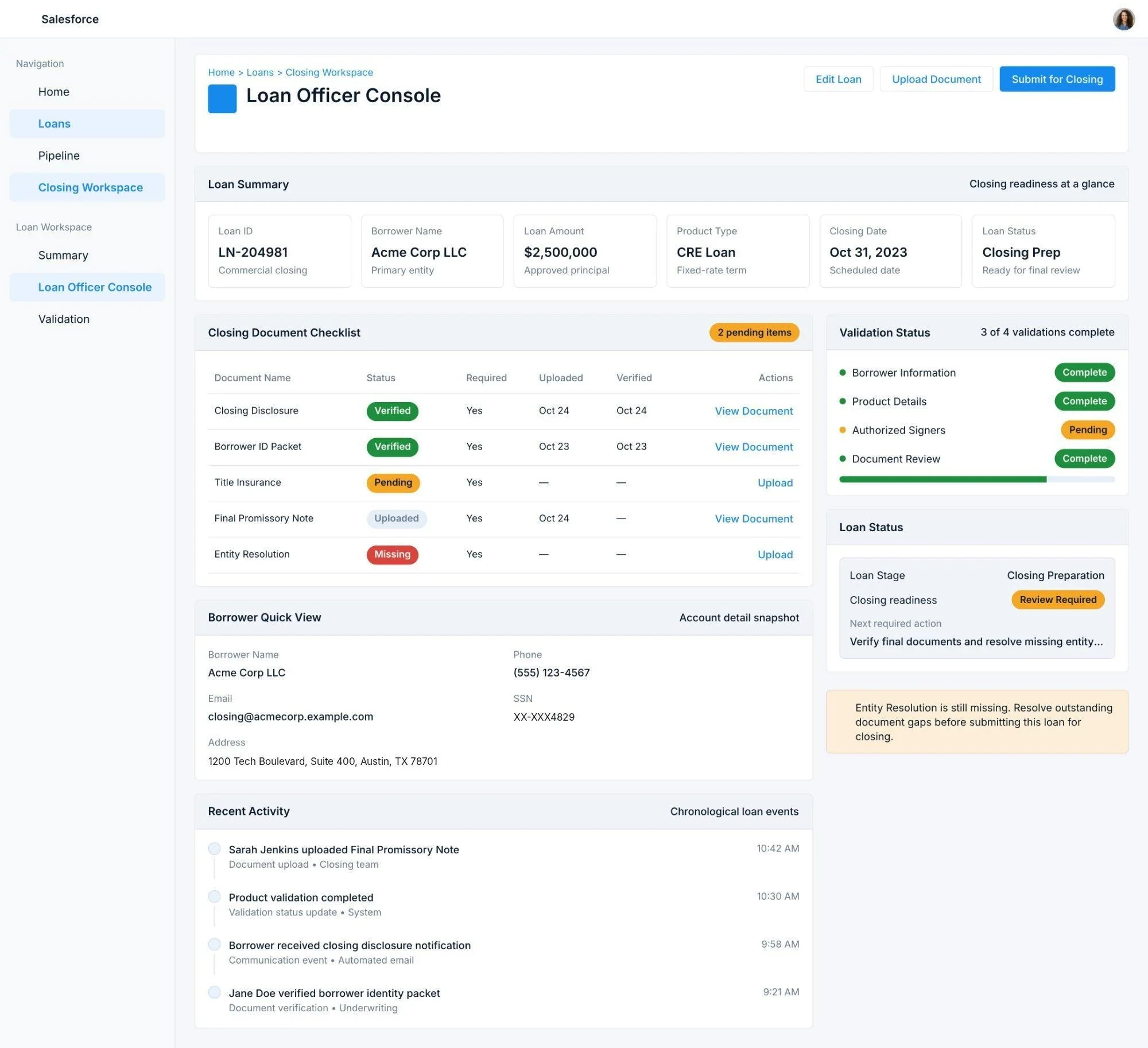
Loan Officer Console — 18 screen jumps → single page

Created a single Lightning page consolidating: Loan Summary highlights panel, Closing Document Checklist (related list with status — e.g. Closing Disclosure and Borrower ID Packet verified, Title Insurance pending, Entity Resolution missing and explicitly blocking submission), Borrower Quick View (compact Account recordDetail), Recent Activity timeline, and Validation Status with color-coded completion indicators. Set as default for Loan Closing Officers profile. Reduced navigation overhead from 3.6 minutes per loan to near zero.

Before18 screen jumps, 3.6 min overhead per loan
Loan Officer Console — unified workspace with loan summary, document checklist showing pending/verified/missing states, borrower quick view, validation status panel, recent activity timeline, and loan status — replacing 18 screen jumps
AfterWhy one page: 18 screen jumps cost 3.6 minutes per loan and stretched training to 6 weeks. Everything an officer needs for a loan now sits on one page.
Decision 05

Field locking after validation — with manager override

Once a section is marked validated, its borrower, product or signer data locks. Operations Manager profile exempt — overrides are recorded in the audit log, preserving compliance accountability without blocking legitimate corrections. Each validation event logs who validated and when (e.g. "Validated by: Michael Chen, Loan Officer — Today at 2:42 PM"), so the audit trail shows both the lock and its origin.

The locking rule, in plain words

If the borrower is marked validated, nobody can change the name, SSN or address, unless they are a Loan Operations Manager, and every override is logged.

Field locking screen — Borrower Validated badge, read-only fields, warning message about locked state, validation history showing who validated and when, override access panel with Request Manager Override button
AfterWhy lock: once data was checked, nothing stopped it changing later. Validated fields now lock, with a logged manager override for real corrections.
Decision 06

Intelligent routing — connecting existing User fields to assignment Flow

Officer profiles already had specialization, certification level, current workload and maximum capacity (added in 2020). The assignment Flow was last updated in 2018 and never referenced them. Updated the Flow to use these fields. Zero new data modeling required — just connected what already existed. Eliminated manual selection, workload imbalance, and cherry-picking.

Before: Loan Assignment with a plain officer dropdown and an uneven officer workload of 12, 9, 3 and 4 active loans
BeforeThe dropdown the Flow replaced: no workload balancing, no specialization matching. The routing rules now read the same officer fields shown in the workload panel.
Decision 07

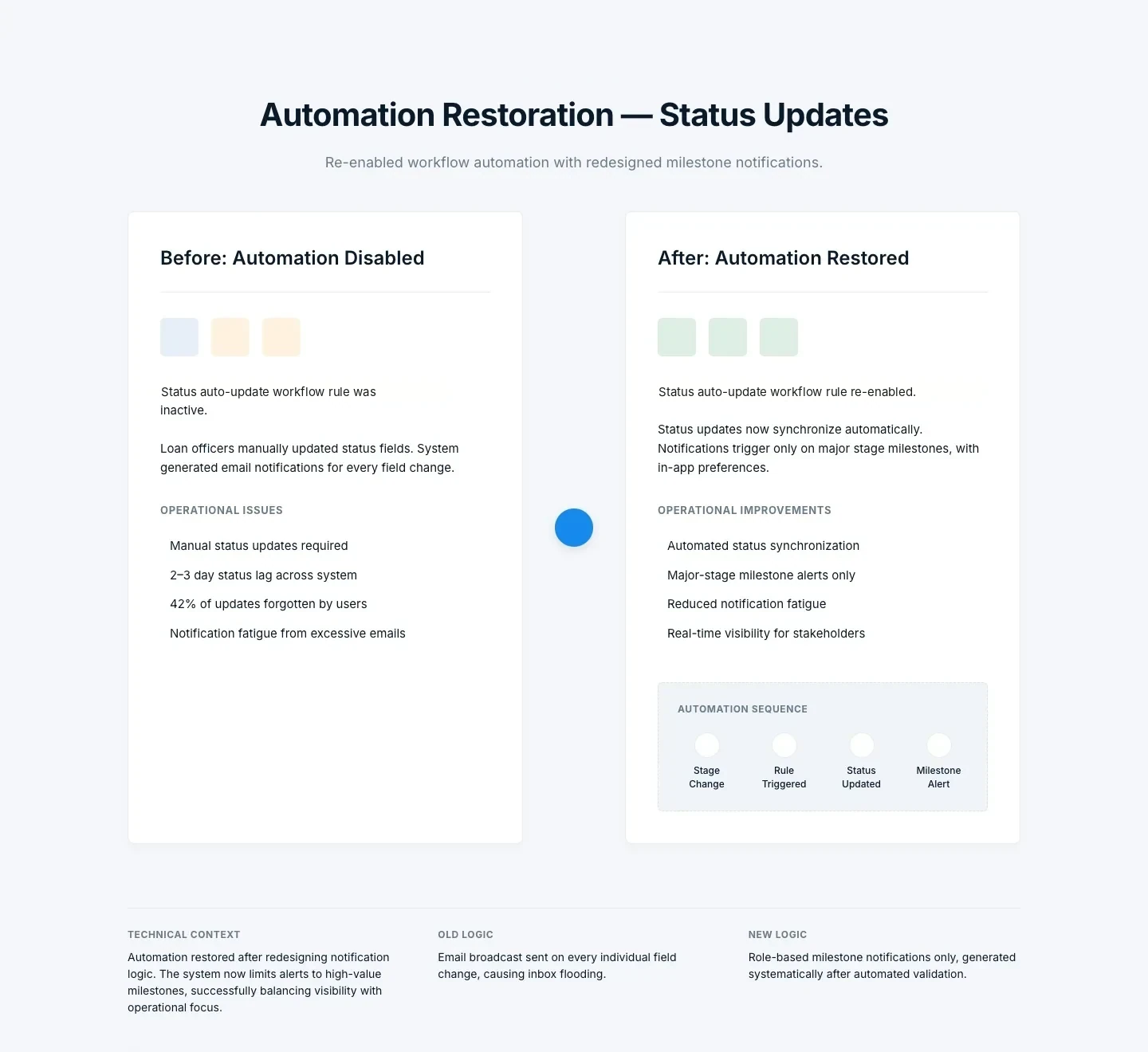
Automation restoration — re-enabled with fixed notification design

Switched the status auto-update rule back on. Fixed the actual problem: replaced blanket email-on-every-change with role-based milestone notifications (major stage changes only) and in-app notification preference option. Automated status sync restored, notification fatigue eliminated. 882 hours of annual manual work recovered.

BeforeAuto-update rule inactive, 42% forget rate
Automation Restoration: before, the status rule inactive with manual updates and 2–3 day lag; after, the rule re-enabled with major-stage milestone alerts only
Before / afterWhy restore, not rebuild: the rule worked; the emails didn't. Turning it back on with milestone-only alerts removed the manual step and the inbox flood.
Pattern used throughout

For high-dependency fields: display read-only + deep link, never move

Several fields appeared in multiple sections. The instinct was to consolidate them. Elements showed 12 reports, 3 Flows, and external integrations referenced those field locations. Moving fields breaks report queries. The pattern used throughout: surface data where users need it in read-only form, deep-link to the canonical location for edits. Safe to ship, no dependency breakage.

New fields created
Added to each loanWhy
Borrower, product and signer "validated" flagsOne trusted check instead of four
Validated by, and whenAudit trail for every lock
Complexity score (0–13)Sets routing priority from the loan's details
Already on officer profiles, now used
Specialization, certification levelMatches each loan to the right officer
Current workloadUpdated on assignment, so work is balanced
Net effect
4 → 1validation screens
18 → 1navigation surface
LockedDurable "validated and locked" state
RoutedIntelligent routing from existing fields
RestoredAutomation restored with correct notification design

All shipped safely inside Salesforce/nCino.

06Impact

17 days to 4

Once dependencies were visible, the team could simplify without fear.

  1. 06.1How impact was measured
  2. 06.2Testing & validation
  3. 06.3Rollout
  4. 06.4Governance
  5. 06.5Results
Metrics methodology

How impact was measured

Pre/post comparison windows, aligned baselines, pilot shadowing. The numbers came from real measurement, not estimation.

Cycle Time

  • Baseline: 90-day historical average (pre-change)
  • Post: 90-day average after rollout stabilization
  • Metric: Median days from Post Approval → Booked

Accuracy

  • Measured rework loops + correction frequency
  • Tracked validation override frequency post-locking
  • Before/after locked validation rules comparison

User Satisfaction

  • Survey sample: Loan Closing Officers
  • Scale: 1–5 Likert
  • Baseline 52% → post-rollout 94%

Support Noise

  • Status-related tickets tracked Q1 vs Q2
  • Baseline: 1,270 tickets in Q1
  • Measured reduction after automation restoration
Testing & validation

Tested before full rollout

We tested every change before full rollout instead of assuming it worked. The pilot group served as a live usability test, with structured observation and task metrics tracked across the first 30 days.

Decision 01

Validation Dashboard — observed task testing

  • Separate task test: 5 loan closing officers completed the validation workflow on real loans
  • Task: complete all 3 validation sections without navigating away
  • Result: 100% task completion on first attempt — zero navigation exits observed
Before consolidation: avg 4 tab switches, 6.2 min. After: 0 tab switches, 2.1 min. Observed during 30-day pilot shadowing.
Decision 06

Intelligent routing — workload accuracy check

  • Routing logic validated against 2 weeks of historical assignment data
  • Checked: did automated assignments match what experienced officers would have chosen?
  • Alignment rate: 91% — 9% flagged for rule refinement before full rollout
  • Edge cases identified: construction loans with dual specialization requirements
Rule engine refined before team-wide rollout. No manual overrides required in first 30 days of live operation.
Decision 07

Automation restoration — notification design validation

  • Re-enabled automation tested with pilot group of 3 officers for 2 weeks before full team
  • Tracked: email volume per loan, status update lag, and officer override frequency
  • Email volume dropped from ~18 notifications per loan to 4 milestone alerts
  • Zero complaints about notification fatigue from pilot group
Confirmed the 2019 fix was addressing the wrong variable. Notification redesign, not automation removal, was the correct intervention.

Pilot metrics (30-day window, 3 officers)

Avg closing time9.2 days

Down from 17-day baseline

Validation errors0

Zero rework loops in pilot window

Status lag<2hr

Down from 2–3 day lag

What the pilot confirmed before full rollout

  • Validation locking didn't create operational friction — no manager override requests in 30 days
  • Loan Officer Console reduced avg task time for document review by 58%
  • Officers stopped asking "did the fee generate?" — visible automation eliminated the uncertainty
  • No dependency breakage detected across 30 days of live operation
Rollout

Pilot first, then the full team

The redesigned screens went to 3 senior officers before anyone else. They worked live loans on them for 30 days, and the full team switched over only after that pilot ran clean.

Step 1Pilot · 3 senior officers

30 days on live loans. Watched how they used the Validation Dashboard, the console and field locking.

Step 2Full team

Once the pilot finished with no manager override requests and no dependency breakage, the screens became the default for the whole loan closing team.

Governance

Governance & Sustainability Model

Shipping the changes was only half of it. Without a governance model, the same layered, redundant architecture would rebuild itself over the next five years.

Change Governance

Dependency review required before any new feature. Automation changes reviewed for notification impact. Validation state cannot be bypassed without an audit trail.

Operational Guardrails

Notification logic reviewed quarterly. Routing logic monitored monthly for load imbalance. Reporting dependencies kept current in Elements.cloud.

Strategic Roadmap

Near-term: System-to-system document sync to replace RM email exchanges. Mid-term: use the complexity score for predictive routing and SLA forecasting.

Result

The redesign also stopped the system from piling up new layers of patches.

Impact

The workflow finally behaved consistently

Once dependencies were visible, the team could simplify without fear. The workflow finally behaved consistently — and the numbers reflected it.

Closing time76%17 days → 4 days max, subject to all required documents
Hours saved2,940Annual efficiency gain
Accuracy99%First-time (up from 88%)
Satisfaction94%Up from 52% post-rollout
Compliance0Findings post-change
Capacity1.4 FTEEquivalent gained

"We finally understood what depended on what — so we could fix it without fear of breaking something."

Stakeholder summary (paraphrased)

"This is incredibly valuable. We can finally see what's broken."

Operations Director — after verification workshop